Baremetal Tutorial Example Design
Introduction
Overview
This example builds a bare-metal Hello World application for the Hard Processor System (HPS) on the Agilex 3 FPGA and SoC C-Series Development Kit. It uses the Quartus hardware design from the HPS Baseline System Example Design and links a small main.c against the baremetal-drivers repository. The application runs directly on a Cortex-A55.
There are two example variants. One resides in the OCRAM, and is part of the configuration bitstream in QSPI. The other resides in DDR, and is loaded by the bootloader from SD card.
| Variant | Where the image runs | How it starts |
|---|---|---|
| OCRAM | HPS on-chip RAM. linker_ocram.ld places code at 0x00000000. |
quartus_pfg stores hps_baremetal.hex in the JIC and RBF programming files. |
| DDR | External DDR. linker_ddr.ld places code at 0x80200000. |
TF-A BL2 loads fip.bin from the SD card. BL31 hands off to the application at 0x80200000. |
Both variants use HPS UART0 at 115200 baud, 8 data bits, no parity, and 1 stop bit. main.c prints the platform banner from platform_print_info(), then prints Hello, Baremetal World! once per second. The string comes from examples/hello/hello_selftest.c in the bare-metal repository.
The OCRAM main.c locks the PLLs, programs the UART from the measured L4_SP clock, and spaces the messages with a CPU spin loop. The DDR main.c initializes the clock manager and the GIC, and spaces the messages with the performance counter. The repository README also describes the repository's own bring-up image, which continues from the same banner into a serial command shell. That shell, its commands, and the memory map are documented in the repository links below.
Prerequisites
The following are required to be able to fully exercise the Agilex 5 FPGA E-Series 013B Development Kit GSRD:
- Altera® Agilex™ 5 FPGA E-Series 013B Development Kit, ordering code DK-A5E013BM16AEA. Refer to board documentation for more information about the development kit.
- Host PC with:
- Linux OS installed. Ubuntu 22.04LTS was used to create this page, other versions and distributions may work too
- Serial terminal (for example GtkTerm or Minicom on Linux and TeraTerm or PuTTY on Windows)
- Altera® Quartus® Prime Pro Edition Version 26.3.
- Internet connection. For downloading the files, especially when rebuilding the GSRD.
Repositories
The Quartus project and the example main.c and build.sh files come from the Agilex 3 HPS baseline project. CMake FetchContent clones baremetal-drivers at the commit pinned in the example CMakeLists.txt. The DDR build also clones Trusted Firmware-A at the commit pinned in cmake/bm_boot.cmake.
| Repository | Revision | Role in this example |
|---|---|---|
| altera-fpga/agilex3-ed-hps-baseline | QPDS26.3_REL_BASELINE_PR |
065A Premium baseline hardware design, and the Hello World example under dk-a3w135bm16aea/baseline/software/hps_baremetal/. |
| altera-fpga/baremetal-drivers | 66bdcc347564c5698a8997169bce83a31647d618 on main (26.3 Release Update) |
Startup code, HPS drivers, public APIs, the Hello World source, and the SD-image tools. |
| altera-opensource/arm-trusted-firmware | 4a4b4573e12fabd0a88e95952af49840db6b770d, tag QPDS26.1_REL_GSRD_PR, branch socfpga_v2.14.0 |
BL2, BL31, and fiptool, fetched by the DDR build. |
The example folders in the baseline repository have their own build notes:
Bare-metal Drivers Repository
baremetal-drivers is bare-metal software for the HPS on Agilex 5 and Agilex 3 SoC FPGA devices. It runs on the Arm Cortex-A cores with no operating system. The commit used here is organized as follows:
| Path | Contents |
|---|---|
src/ |
startup.S, vectors.S, and crt0.c |
platform/ |
Agilex 5 and Agilex 3 setup for clocks, UART, and the BUILD_MODE linker script |
api/ |
Public APIs, one directory per module |
drivers/ |
Register-level drivers |
middleware/ |
Context and lifecycle code between the APIs and the drivers: bridge, DMA, IOSSM, reset manager, and UART |
examples/ |
Sample commands, including examples/hello/hello_selftest.c |
cmake/ |
Cross-compile setup (bm_toolchain.cmake), ELF/BIN/HEX generation (bm_artifacts.cmake), and the TF-A fetch plus BL2/BL31/fiptool build (bm_boot.cmake) |
tools/ |
sdimage_build.sh and make_sdimage.sh, which place fip.bin in the SD card A2 partition |
linker_ocram.ld, linker_ddr.ld |
Memory placement for the two build modes |
The example sets PLAT=agilex3 and BUILD_MODE, then links main.c with the bm_app, platform, and bm_api libraries. It also compiles the repository startup files and examples/hello/hello_selftest.c. After the ELF is linked, bm_generate_artifacts() writes hps_baremetal.bin, hps_baremetal.hex, and hps_baremetal.dump.
BUILD_MODE selects the link address and how much early hardware setup the application performs. An OCRAM image brings up the PLLs and the UART itself. A DDR image expects TF-A to have initialized DDR and to enter the application at 0x80200000, which is the PRELOADED_BL33_BASE value in cmake/bm_boot.cmake.
Repository Documentation
These pages match the baremetal-drivers commit listed above. The repository README is the entry point for building the repository's own image, from the OCRAM or DDR build through the serial prompt. DOCUMENTATION.md indexes the module guides and describes the optional Natural Docs reference (make docs).
| Document | What it covers |
|---|---|
| README.md | Supported kits, OCRAM and DDR bring-up, UART settings, the command shell, the memory map, and troubleshooting |
| DOCUMENTATION.md | Index of the module guides, terminology, and the Natural Docs API reference |
| BUILD.md | Toolchain, PLAT, BUILD_MODE, DEBUG, and build outputs |
| BUILD_LINUX.md | How to get the code and build on Linux |
| BUILD_WINDOWS.md | How to build with VS Code and boot from Windows |
| RETURN_VALUES.md | How to read 0, a negative error code, and output arguments |
| middleware/README.md | Middleware between the public APIs and the drivers |
Each module has an integration guide at api/<module>/README.md. The guide describes the module, what must already be set up, the order of calls, and how to read the example output.
| Module | Guide |
|---|---|
| HPS-to-FPGA bridge | bridge |
| CCU | ccu |
| Clock manager | clk_mngr |
| ComboPHY | combophy |
| Console and CLI | console |
| CRC | crc |
| DMA | dma |
| ECC | ecc |
| FCS | fcs |
| GIC | gic |
| GPIO | gpio |
| I2C | i2c |
| I3C | i3c |
| IOSSM | iossm |
| SDM mailbox | mailbox |
| MMU | mmu |
| NoC firewall | noc_firewall |
| NoC probe | noc_probe |
| Performance monitoring | perf |
| Reboot manager | reboot_mngr |
| Reset manager | rst_mngr |
| SD/MMC | sdmmc |
| SEU | seu |
| SMMU | smmu |
| SPI | spi |
| Timer | timer |
| UART | uart |
Build the Examples
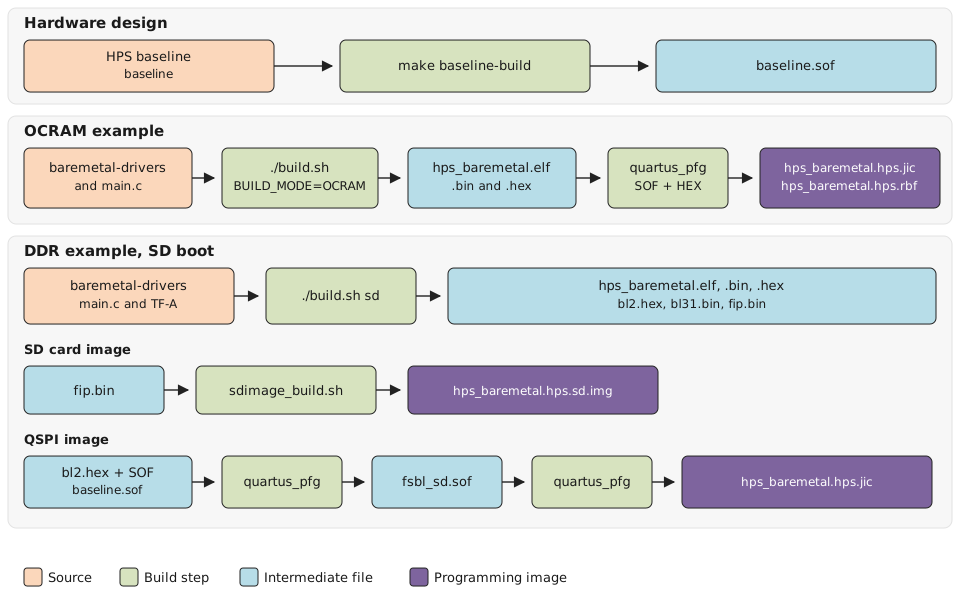
The following diagram shows an overview of how the example design is built:
Setup Build Environment
Create a top folder for the example:
Download the compiler toolchain, add it to the PATH variable, to be used by the GHRD makefile to build the HPS Debug FSBL:
cd $TOP_FOLDER
wget https://developer.arm.com/-/media/Files/downloads/gnu/14.3.rel1/binrel/\
arm-gnu-toolchain-14.3.rel1-x86_64-aarch64-none-linux-gnu.tar.xz
tar xf arm-gnu-toolchain-14.3.rel1-x86_64-aarch64-none-linux-gnu.tar.xz
rm -f arm-gnu-toolchain-14.3.rel1-x86_64-aarch64-none-linux-gnu.tar.xz
export PATH=`pwd`/arm-gnu-toolchain-14.3.rel1-x86_64-aarch64-none-linux-gnu/bin/:$PATH
export ARCH=arm64
export CROSS_COMPILE=aarch64-none-linux-gnu-
Enable Quartus tools to be called from command line:
Build Quartus Design
Get the example design files and build the hardware design:
cd $TOP_FOLDER
rm -rf agilex3_soc_devkit_ghrd && mkdir agilex3_soc_devkit_ghrd && cd agilex3_soc_devkit_ghrd
wget https://github.com/altera-fpga/agilex3-ed-hps-baseline/releases/download/QPDS26.3_REL_BASELINE_PR/dk-a3w135bm16aea-baseline.zip
unzip dk-a3w135bm16aea-baseline.zip
rm -f dk-a3w135bm16aea-baseline.zip
make baseline-build
The following files are created:
$TOP_FOLDER/agilex3_soc_devkit_ghrd/output_files/baseline.sof
Build the OCRAM Example
1. Go to the example folder:
2. Run the build script:
The script is simple, alternatively the commands could just be ran directly:
cmake -S . -B build -G "Unix Makefiles" -DPLAT=agilex5 -DBUILD_MODE=OCRAM
cmake --build build -j"$(nproc)"
This will create the following files in the folder $TOP_FOLDER/agilex3_soc_devkit_ghrd/software/hps_baremetal/baremetal_ocram/build:
hps_baremetal.elfhps_baremetal.binhps_baremetal.hex
3. Go to the build folder:
4. Create the JIC image for running form QSPI flash:
quartus_pfg -c ../../../../output_files/baseline.sof hps_baremetal.jic \
-o device=QSPI128 \
-o flash_loader=A3CW135BM16AE6S \
-o hps_path=hps_baremetal.hex \
-o mode=ASX4 \
-o hps=1
This will create the following files in the folder $TOP_FOLDER/agilex3_soc_devkit_ghrd/software/hps_baremetal/baremetal_ocram/build:
hps_baremetal.hps.jic: qspi programming file, including the configuration bitstream and the baremetal programhps_baremetal.core.rbf: Fabric configuration file. Not used by this example.
5. Create the RBF file for running through JTAG:
quartus_pfg -c ../../../../output_files/baseline.sof hps_baremetal.rbf \
-o hps_path=hps_baremetal.hex \
-o hps=1
This will create the following files in the folder $TOP_FOLDER/agilex3_soc_devkit_ghrd/software/hps_baremetal/baremetal_ocram/build:
hps_baremetal.hps.rbf: JTAG configuration file, including the configuration bitstream and the baremetal programhps_baremetal.core.rbf: Fabric configuration file. Not used by this example.
Build the DDRAM Example
1. Go to the example folder:
2. Run the build script:
This will create the following files in the folder $TOP_FOLDER/agilex3_soc_devkit_ghrd/software/hps_baremetal/baremetal_ddr/build_sd:
sd_binaries/fsbl_sd.sof: SOF file with BL2 bootloader insidehps_baremetal.elf: application ELF filehps_baremetal.bin: application BIN filehps_baremetal.hex: application HEX filehps_baremetal.hps.sd.img: SD card image
3. Go to the build_sd folder:
4. Build the QSPI image file
quartus_pfg -c sd_binaries/fsbl_sd.sof hps_baremetal.jic \
-o device=QSPI128 \
-o flash_loader=A3CW135BM16AE6S \
-o mode=ASX4 \
-o hps=1
This will create the following files in the folder $TOP_FOLDER/agilex3_soc_devkit_ghrd/software/hps_baremetal/baremetal_ddr/build_sd:
hps_baremetal.hps.jic: qspi programming file, including the configuration bitstream and the baremetal programhps_baremetal.core.rbf: Fabric configuration file. Not used by this example.
Run the Examples
Run the OCRAM Example
1. Write the QSPI image: $TOP_FOLDER/agilex5_soc_devkit_ghrd/software/hps_baremetal/baremetal_ocram/build/hps_baremetal.hps.jic
2. Power cycle the board.
3. See the program output on the console:
Welcome to SoCFPGA Baremetal World for Agilex3 Platform
Built: 20:47:11 Nov  9 2026
Commit:
Running on Core 0
Type 'help' for commands.
Hello, Baremetal World!
Hello, Baremetal World!
Hello, Baremetal World!
The hello message will continue to be displayed until board is powered down.
Run the DDRAM Example
1. Write the SD card image: $TOP_FOLDER/agilex5_soc_devkit_ghrd/software/hps_baremetal/baremetal_ddr/hps_baremetal.hps.sd.img
2. Write the QSPI image: $TOP_FOLDER/agilex5_soc_devkit_ghrd/software/hps_baremetal/baremetal_ddr/build_sd/hps_baremetal.hps.jic
3. Power cycle the board.
4. See the program output on the console. It will show U-Boot SPL, then U-Boot, then the baremetal program output:
Welcome to SoCFPGA Baremetal World for Agilex3 Platform
Built: 20:44:09 Nov  9 2026
Commit:
Running on Core 0
Type 'help' for commands.
Hello, Baremetal World!
Hello, Baremetal World!
Hello, Baremetal World!
Notices & Disclaimers
Altera® Corporation technologies may require enabled hardware, software or service activation. No product or component can be absolutely secure. Performance varies by use, configuration and other factors. Your costs and results may vary. You may not use or facilitate the use of this document in connection with any infringement or other legal analysis concerning Altera or Intel products described herein. You agree to grant Altera Corporation a non-exclusive, royalty-free license to any patent claim thereafter drafted which includes subject matter disclosed herein. No license (express or implied, by estoppel or otherwise) to any intellectual property rights is granted by this document, with the sole exception that you may publish an unmodified copy. You may create software implementations based on this document and in compliance with the foregoing that are intended to execute on the Altera or Intel product(s) referenced in this document. No rights are granted to create modifications or derivatives of this document. The products described may contain design defects or errors known as errata which may cause the product to deviate from published specifications. Current characterized errata are available on request. Altera disclaims all express and implied warranties, including without limitation, the implied warranties of merchantability, fitness for a particular purpose, and non-infringement, as well as any warranty arising from course of performance, course of dealing, or usage in trade. You are responsible for safety of the overall system, including compliance with applicable safety-related requirements or standards. © Altera Corporation. Altera, the Altera logo, and other Altera marks are trademarks of Altera Corporation. Other names and brands may be claimed as the property of others.
OpenCL* and the OpenCL* logo are trademarks of Apple Inc. used by permission of the Khronos Group™.