OP-TEE Hello World Tutorial Example Design User Guide
Introduction
OP-TEE is an open-source Trusted Execution Environment for Arm TrustZone. This example design demonstrates building and running a simple OP-TEE application on the Altera Agilex 5 FPGA E-Series 013B Development Kit.
Prerequisites
The following are required to be able to fully exercise the Agilex 5 FPGA E-Series 013B Development Kit GSRD:
- Altera® Agilex™ 5 FPGA E-Series 013B Development Kit, ordering code DK-A5E013BM16AEA. Refer to board documentation for more information about the development kit.
- Host PC with:
- Linux OS installed. Ubuntu 22.04LTS was used to create this page, other versions and distributions may work too
- Serial terminal (for example GtkTerm or Minicom on Linux and TeraTerm or PuTTY on Windows)
- Altera® Quartus® Prime Pro Edition Version 26.3. The hardware build uses a full Quartus compile, and the software script uses
quartus_pfgto generate the QSPI image.
- Internet connection. For downloading the files, especially when rebuilding the GSRD.
Source repositories and revisions
| Component | Repository | Selection made by the script | Recorded revision |
|---|---|---|---|
| This GHRD | altera-fpga/agilex5e-ed-gsrd | Repository containing this example; tag QPDS26.3_REL_BASELINE_PR |
8d88fc5aaa426942f63684d2a7cbc8acab82bb73 |
| OP-TEE OS | BenjaminLimJL/optee_os | Branch socfpga_agilex5_optee |
38bbd8423336b88cbfc0d6c00609bb4814985b60 before local patches |
| OP-TEE Client | OP-TEE/optee_client | Tag 4.5.0 |
6486773583b5983af8250a47cf07eca938e0e422 |
| OP-TEE examples | BenjaminLimJL/optee_examples | Branch master |
934c7edb74a26e90f68024cf441073528444177f before local patches |
| TF-A | altera-fpga/arm-trusted-firmware | Default branch (socfpga_v2.15.0 at capture time); release tag QPDS26.3_REL_BASELINE_PR |
09c4dc6628810d8570af69db43918d344f9e80e9 before local patches |
| U-Boot | altera-fpga/u-boot-socfpga | Default branch (socfpga_v2026.07 at capture time); release tag QPDS26.3_REL_BASELINE_PR |
5ba74aeda63ed07e98670f8c2f0135de06543ba0 before local patches |
| Linux | altera-fpga/linux-socfpga | Shallow clone of the default branch (socfpga-6.18.37-lts at capture time); release tag QPDS26.3_REL_BASELINE_PR |
0c0e456cdde08783d0a56ef593af45899f5d11af before local patches |
Local patches
| Patch | Mail patch ID | Effect |
|---|---|---|
0001-optee_platform_agilex5.patch |
— | Adds the Agilex 5 OP-TEE platform: TZDRAM at 0x83000000 (32 MiB), GICv3, 8250 UART, and TF-A integration. Applied with git apply. |
0001-svc-pta-Add-OP-TEE-OS_sdm_svc_pta.patch |
— | Adds the SDM Services pseudo-TA. Applied with git apply. |
optee_examples_agilex5/*.patch (16 patches) |
— | Adds SDM service examples (host application and trusted application). hello_world is built from the unmodified tree before these patches are applied. |
0002-feat-altera-intel-NJP-support-for-ATF.patch |
d1c47cb0e5486915c4ce1e36b33f77545eb661e4 |
Adds SDM eFuse and VAB secure-mailbox SiP calls, and limits which of those SMCs non-secure world may invoke |
0001-arm-socfpga-Add-OP-TEE-memory-to-SDRAM-firewall_uboot.patch |
5fa2bf529f7348405954507522edbb7ec1fd016f |
Protects the OP-TEE TZDRAM gap in the MPU, non-MPU, and F2SDRAM firewalls |
0002-arm-socfpga-Add-OP-TEE-OS-as-a-loadable-firmware-in-_uboot.patch |
9ff76096ec0308df321aba6960ff01a0c2d2683c |
Adds OP-TEE to the U-Boot FIT at 0x83000000, moves kernel_addr_r to 0x85000000, and lets SPL find the image under /images as well as /fit-images |
0001-arm64-agilex5-enable-optee-support-for-agilex5_linux.patch |
804e3a5c3e297530700dbd02955ef37ee259d23e |
Adds the TZDRAM reservation and the OP-TEE firmware node to socfpga_agilex5_socdk_013b.dts, which is the DTB copied to the SD card |
0002-arm64-agilex5-enable-optee-support-for-agilex5_013b-_linux.patch |
30ecf98c8e791d1333f4e3c80becc1c73fb1db4c |
Adds the same nodes to socfpga_agilex5_socdk_013b_sdmmc_atfboot.dts |
Build Example Design
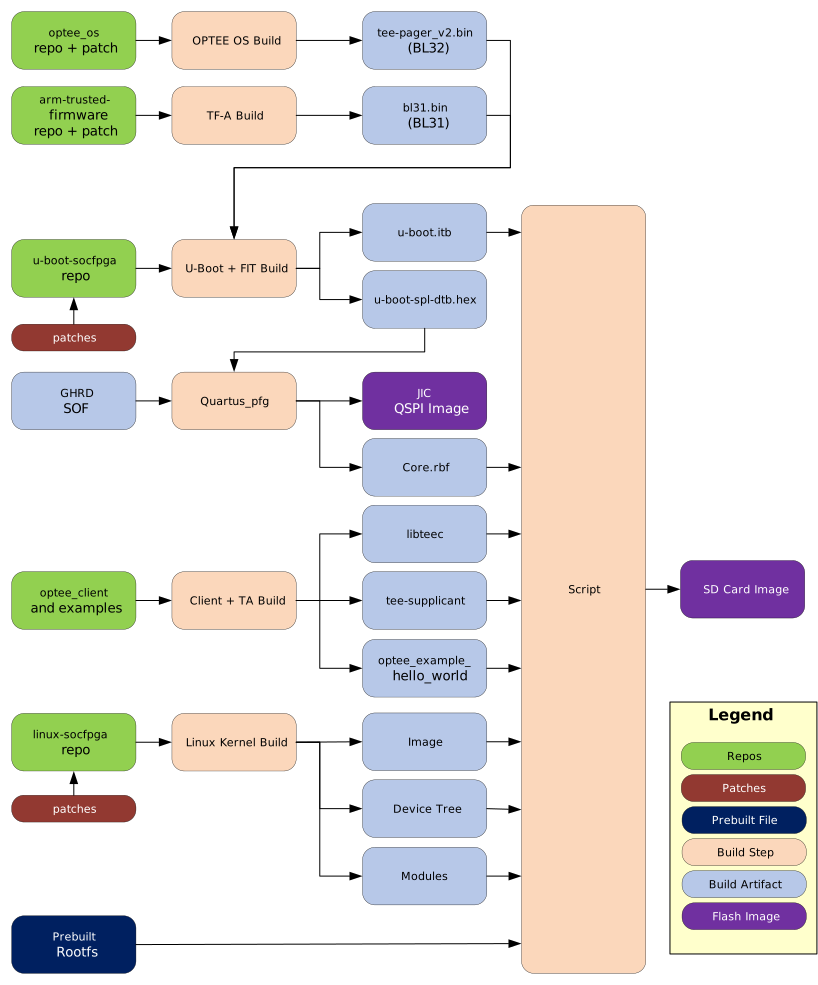
The following diagram shows an overview of how the example design is built:
1. Install the required tools if not already done.
The flow is written for Bash on Linux and requires network access to GitHub, Arm Developer, RocketBoards, PyPI, Debian, GNU mirrors, and kernel.org. For Debian or Ubuntu, the following command can be used to install the required tools:
sudo apt-get update
sudo apt-get install \
  autoconf automake bc bison build-essential cmake dosfstools e2fsprogs \
  fakeroot flex gawk genimage git libconfuse-dev libelf-dev libssl-dev \
  libtool mtools pkg-config python3 python3-cryptography python3-pip \
  python3-pyelftools rsync uuid-dev wget xz-utils
2. Create a top folder for the example:
sudo rm -rf agilex5-013b.optee_hello
mkdir agilex5-013b.optee_hello
cd agilex5-013b.optee_hello
export TOP_FOLDER=`pwd`
3. Add Quartus tools to the PATH:
4. Get the example design files and build the hardware design:
cd $TOP_FOLDER
rm -rf agilex5_soc_devkit_ghrd && mkdir agilex5_soc_devkit_ghrd && cd agilex5_soc_devkit_ghrd
wget https://github.com/altera-fpga/agilex5e-ed-gsrd/releases/download/QPDS26.3_REL_BASELINE_PR/dk-a5e013bm16aea-baseline-a55.zip
unzip dk-a5e013bm16aea-baseline-a55.zip
rm -f dk-a5e013bm16aea-baseline-a55.zip
make baseline_a55-build
The following files are created:
$TOP_FOLDER/agilex5_soc_devkit_ghrd/output_files/baseline_a55.sof
5. Go to example folder, replace /netbatch with /tmp as that folder may not be available on your machine, but /tmp always is:
cd $TOP_FOLDER/agilex5_soc_devkit_ghrd/software/ryo_optee/
sed -i 's|/netbatch/|/tmp/|g' ryo_optee_sd.sh
6. Provide the SOF file to where the build script needs it:
7. Invoke the build script:
Once the build is done, it displays this message:
========================================
DONE
========================================
Key outputs:
  OP-TEE OS : optee_os/out/agilex5/core/tee-pager_v2.bin
  BL31      : arm-trusted-firmware/build/agilex5/release/bl31.bin
  U-Boot ITB : uboot-socfpga/u-boot.itb
  Kernel    : linux-socfpga/arch/arm64/boot/Image
  DTB       : linux-socfpga/arch/arm64/boot/dts/intel/socfpga_agilex5_socdk_013b.dtb
  SD image  : sd_image/sdcard.img
  JIC       : ghrd_sd.hps.jic
Run Example Design
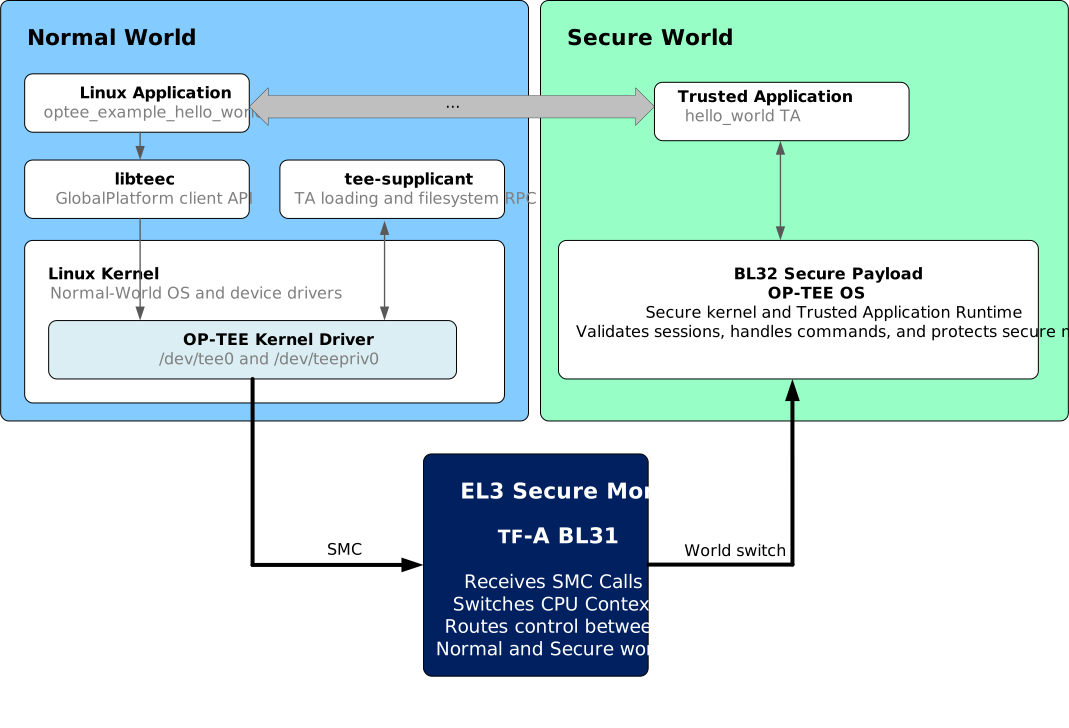
In this example, /usr/bin/optee_example_hello_world opens a session to the TA. The application is simple: it sends the integer 42; the TA increments it and returns 43.
The following diagram depicts the runtime operation:
The steps to run the example are:
1. Write SD card image
2. Flash QSPI image
3. Power cycle the board
4. Linux will boot. When prompted enter 'root' as the username, and no password will be asked for.
5. Display the Linux boot log related to OP-TEE:
root@agilex5dka5e013bm16aea:~# dmesg | grep -i optee
[    0.000000] OF: reserved mem: 0x0000000083000000..0x0000000084ffffff (32768 KiB) nomap non-reusable optee@83000000
[    1.871696] optee: probing for conduit method.
[    1.876232] optee: revision 4.9 (38bbd8423336b88c)
[    1.892569] optee: dynamic shared memory is enabled
[    1.902497] optee: initialized driver
This shows:
- Reserved memory: The 32 MiB carve-out at 0x83000000-0x84FFFFFF is OP-TEE's secure DDR, declared in the devicetree with no-map so Linux never creates a mapping for it. It matches what OP-TEE OS was built with (CFG_TZDRAM_START/CFG_TZDRAM_SIZE).
- Driver probe: Revision 4.9 is OP-TEE OS reporting itself over the SMC interface, and that hash is the build ID of the running secure image. Dynamic shared memory is enabled means the kernel can register arbitrary normal-world pages with secure world on demand instead of being limited to a small fixed static SHM pool.
6. Show the device nodes:
root@agilex5dka5e013bm16aea:~# ls -l /dev/tee*
crw-------    1 root     root      246,   0 May 29 16:30 /dev/tee0
crw-------    1 root     root      246,  16 May 29 16:30 /dev/teepriv0
This shows that both device nodes are present, so the driver registered client and privileged interfaces.
7. Check that the tee-supplicant is running:
8. Run the Trusted Application:
root@agilex5dka5e013bm16aea:~# /usr/bin/optee_example_hello_world
I/TC: WARNING (insecure configuration): Failed to get monotonic counter for REE FS, using 0
I/TC: WARNING (insecure configuration): Failed to commit dirh counter 2
D/TA:  TA_CreateEntryPoint:18 has been called
D/TA:  __GP11_TA_OpenSessionEntryPoint:47 has been called
I/TA: Hello World!
Invoking TA to increment 42
D/TA:  inc_value:78 has been called
I/TA: Got value: 42 from NW
I/TA: Increase value to: 43
TA incremented value to 43
I/TA: Goodbye!
D/TA:  TA_DestroyEntryPoint:29 has been called
The warnings are related to the fact that OP-TEE wants a hardware monotonic counter to protect the REE filesystem secure storage against rollback. That is typically provided by an eMMC device which is not present in this design.
The D/TA and I/TA prefixed lines are logs coming from the secure world. The messages without the prefix are coming from the normal world.
Notices & Disclaimers
Altera® Corporation technologies may require enabled hardware, software or service activation. No product or component can be absolutely secure. Performance varies by use, configuration and other factors. Your costs and results may vary. You may not use or facilitate the use of this document in connection with any infringement or other legal analysis concerning Altera or Intel products described herein. You agree to grant Altera Corporation a non-exclusive, royalty-free license to any patent claim thereafter drafted which includes subject matter disclosed herein. No license (express or implied, by estoppel or otherwise) to any intellectual property rights is granted by this document, with the sole exception that you may publish an unmodified copy. You may create software implementations based on this document and in compliance with the foregoing that are intended to execute on the Altera or Intel product(s) referenced in this document. No rights are granted to create modifications or derivatives of this document. The products described may contain design defects or errors known as errata which may cause the product to deviate from published specifications. Current characterized errata are available on request. Altera disclaims all express and implied warranties, including without limitation, the implied warranties of merchantability, fitness for a particular purpose, and non-infringement, as well as any warranty arising from course of performance, course of dealing, or usage in trade. You are responsible for safety of the overall system, including compliance with applicable safety-related requirements or standards. © Altera Corporation. Altera, the Altera logo, and other Altera marks are trademarks of Altera Corporation. Other names and brands may be claimed as the property of others.
OpenCL* and the OpenCL* logo are trademarks of Apple Inc. used by permission of the Khronos Group™.