Drive-On-Chip with PLC Design Example for Agilex™ Devices
Compiling the project using a MDT QAR file
- Download the relevant design
.qarfile for your development kit and power board from link/repository.
- Double click in the .qar file or alternatively use Quartus® command line to
open it:
The contents of the
.qarfile open into the working directory. The design example has the following directory structure.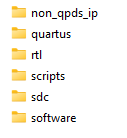
QAR file content.
Note: This
QARfile was generated using the "Modular Design Toolkit" flow.QAR and Project Directory Structure.
Directory Description assets Contains base files to run the example design derived from the hardware compilation. non_qpds_ip Contains the source code (RTL) of the design’s custom IP that is not part of Quartus® Prime. quartus Contains the base files for the Quartus® Project including the top.qpf, top.qsf. rtl Contains the sources files to build the project. scripts Contains a collection of TCL scripts from "Modular Design Toolkit" to build and compile the design software and hardware. sdc Contains the .sdc files for the subsystems to compile the project. software Contains all the files for building the application for the Nios V and/or HPS. Look for the app.elf binary or *_cpu_ram_cpu_ram.hex that is included in the SOF
- Navigate to
<project>/quartus/and open thetop.qpffile either by double clicking on it or using the command:
- To generate the
.soffile, click on "Processing -> Start Compilation Ctrl+L" or simply press the "Start Compilation" icon in the Quartus® Prime Pro GUI.
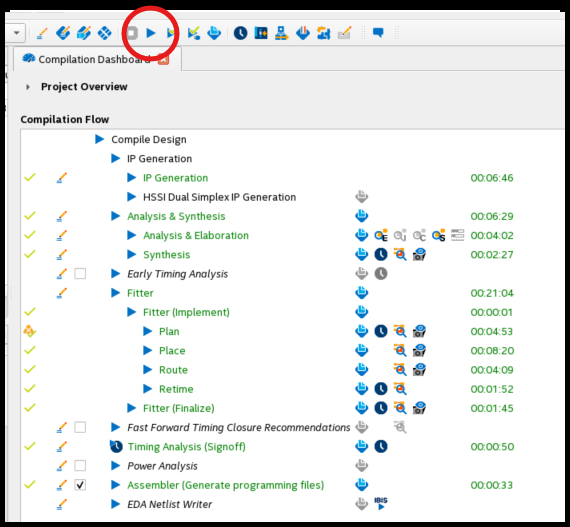
Quartus® Prime Pro compilation flow.
Wait for the compilation to finish. The .sof file should be located in the
<project>/quartus/output_files directory. Follow the steps generate the
RBF/JIC file using the .sof file and the u-boot-spl-dtb.hex file.
Note: it si recommended to generate any embedded software images that are
included in the .sof file before compiling, i.e NiosV software.
Compiling and Building the NiosV application and BSP
Before rebuilding the BSP, ensure that the settings.bsp file correctly generates.
To generate BSP, use command line and niosv-bsp command.
The design includes an initial version of settings.bsp that contains parameters
to run the design. If you modify the Platform Designer's hardware, ensure you keep
the integrity of the settings.bsp file.
-
After changing the
settings.bspfile, compile the application and generate the BSP with the command:
Running make takes an existing template settings.bsp file and creates a new
one based on it for the current project. It updates locations of project then
builds the .bsp and the NiosV application. See the provided makefile
and CMakeList.txt files for more details in about the software build.
The app.elf file is in <project>/software/*niosv_subsystem*/build/bin
If necessary, compile the hardware again to update the .sof file, so it
contains the new binaries (.hex) for memory initialization (<project>/software/*niosv_subsystem*/build/bin/mem_init).
Creating the QSPI Flash and SD card configuration bitstreams for the board
Create phase 1 and phase 2 configuration bitstreams for "HPS First" Flow
Follow these steps if the "HPS init" property for the hps_subsystem in the XML
is set to "HPS FIRST". You can check this property by executing the following
Quartus® command and the "\*.sof" file. For example:
Note: top.sof is located in <project>/quartus/output_files/top.sof
In the log, look for the property "HPS/FPGA configuration order" SET TO "HPS_FIRST"
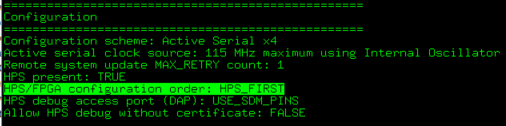
HPS First SOF file.
Important! The following step depends on the output of u-boot compilation
specifically the file u-boot-spl-dtb.hex. To generate the pair top.core.rbf
and top.hps.jic execute:
Note: top.sof is located in <project>/quartus/output_files/top.sof
Create phase 1 and phase 2 configuration bitstream for "FPGA First" Flow
Follow these steps if the "HPS init" property for the hps_subsystem in the XML
is set to "AFTER INIT_DONE". You can check this property by executing the following
Quartus® command and the "\*.sof" file. For example:
In the log, look for the property "HPS/FPGA configuration order" SET TO "AFTER INIT_DONE"
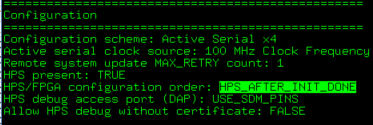
FPGA First SOF file.
Important! The following step depends on the output of u-boot compilation
specifically the file u-boot-spl-dtb.hex. To generate the top.jic execute:
Created: June 21, 2025